While video tracking is the most common method in detecting people in a given space, especially with new tools like openFrameworks, a non-camera / sensor hardware solution would be interesting to look into.
[vimeo 1920188 480 360]
A nice project by rAndom International and Chris O’Shea using openFrameworks video tracking library
NoToVo (2006) by Annemie Maes, Sukandar Kartadinata, Johannes Taelman and Edo Paulus is a very interesting project by some of the best technicians working in the Arts. Mainly using the Cricket location system with additional compass and accelerometer talking to Max/MSP for data analysis, synthesis and spacialization, this project aims for a system that’s not dependent of light and to be modular to set up.
The results are hard to tell from the website but Edo writes on the META list;
“The setup wasn’t very stable. Often the position tracking wasn’t correct. The measuring rate was a bit slow: 2-5 times per second, which was limitation especially when quickly rotating your head. The measuring rate is mainly dependent on the fact that you can only emit ultrasound from one emitter at a time and you have to wait for the ultrasound to accoustically die out.”
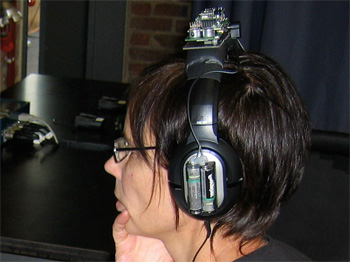
The NoToVo hardware made by Sukandar Kartadinata and Johannes Taelman, they are both familiar faces at STEIM
It seems to me that even with a custom hardware design the essential part is still preconditioning the room and calibration of the system. A system that can capture all degrees of multiple movement still seems extremely difficult (I’m sure the military has figured it out), and like many cases in interactive projects, the smart approach is to find the key interactive element that connects with the experience rather than trying to capture everything from a scientific point of view.
thanks: Byungjun, Edo and META!